Posts

How to connect beaglebone
Image
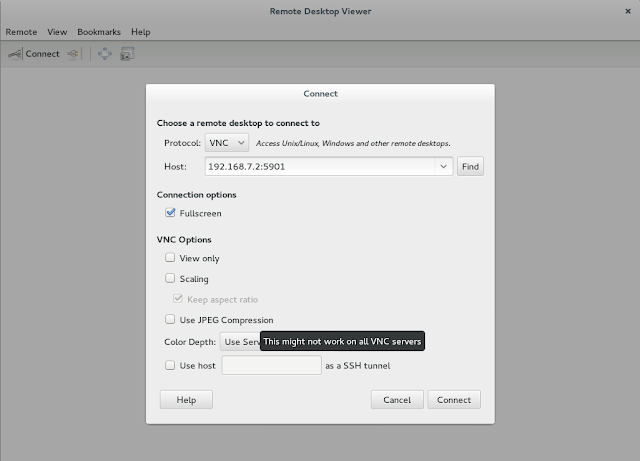
1) [apcoer@localhost-localdomain ~]$ ssh root@192.168.7.2 The authenticity of host '192.168.7.2 (192.168.7.2)' can't be established. ECDSA key fingerprint is c0:81:1a:f4:58:b9:51:15:00:df:ee:71:c4:d9:fd:54. Are you sure you want to continue connecting (yes/no)? y Please type 'yes' or 'no': y Please type 'yes' or 'no': yes Warning: Permanently added '192.168.7.2' (ECDSA) to the list of known hosts. Debian GNU/Linux 7 BeagleBoard.org BeagleBone Debian Image 2014-04-23 Support/FAQ: http://elinux.org/Beagleboard:BeagleBoneBlack_Debian Last login: Wed Apr 23 20:27:40 2014 from 192.168.7.1 root@beaglebone:~# vnc -bash: vnc: command not found root@beaglebone:~# vncserver New 'X' desktop is beaglebone:1 Starting applications specified in /root/.vnc/xstartup Log file is /root/.vnc/beaglebone:1.log root@beaglebone:~# 2) open remote desktop

Android: Using button and setting up on-click listener

src/com/example/blackVwhite/mainactivity.java contains the code res/layout/activity_main.xml contains the layout  Click here to download the program! program to Change the screen color to RGB i.e Red,Green & Blue using buttons or just simply Download

JAVA: String to Star pattern

Click here to View PS: my friend asked me to do this program and i have just proved that my l0gic was right! i haven't added the all the alphabets as it was time consuming but a string like F###-OFF does work! :P

PL-1 : All practicals group assignments

PL-1 : All group assignments click here to download

DMSA : All units Notes

Data base management all UNITS         click here for download

GENERAL:Fun with Linux

So here's a common tutorial on how to SHUTDOWN any PC connected to you on your LAN network using LINUX based OS... first you need to get the IP address of those machines ,, inorder to do so you can try ipneigh or arp on your terminal.... if that doesn't work you should can always try install nmap an applet application for broadcasting to all the IP's on a network , this will get you a list of IP's so inorder to install nmap here's how its done yum install nmap / apt-get nmap nmap <IP> b suppose <IP> = 192.168.1.1 you should replace the digits with * (the more the * the more is the SCAN TIME) E.G.:- 192.168.*.* will get me a list of all the IP's starting from 192.168.   now try these again- ip neigh or arp on your terminal.... after this you can use various commands like init1,init2 .... , poweroff , reboot ..... along with ssh .   command ssh <IP> poweroff this is supposed to shutdown the other PC , you can also use ss...

JAVA: String and String functions

just put in some string functions,,,, interested juzz check it out ;) Click to Download