Posts

Showing posts with the label ma

Algorithm

me ami belong to computer stream , often hear my teachers talking about taking important lectures(that i somehow n accidentally happen to skip) on algorithms , so here i am filling up on those missed lectures ;) so getting back to the  TOPIC what's an algorithm ??? Lets say an algorithm is  any well-defined computational procedure that takes some value, or set of values, as input and produces some value, or set of values, as output. so its just like those maths sums that we've been solving all our lives,  those are just fool-proof steps that run around in a loop while the computer does the calculations..... for example:- say a linear search .... basically its the most basic and the simplest of all.... just to  summarize :- we go through the values one-at-a-time in a linear way (be it ascending or descending-but mostly ascending) say example we need to find number 6  from a given set of numbers(let the numbers be in an array) [8,1,4...
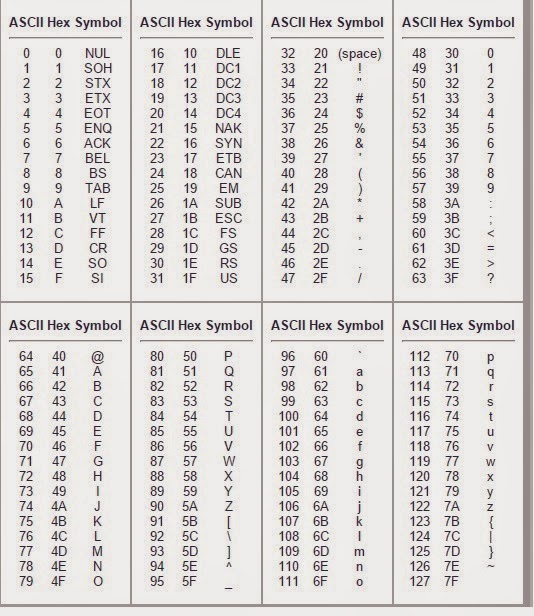
MA: ascii values

Image
Ascii values & characters

Rules for drawing a FLOWCHART

Image
Terminator All flowcharts start and end with the terminator or terminal shape. This is a rounded rectangle and is shown below. You use this same shape for both the start and the end. You will see some charts with slightly different terminal shapes. For example, sometimes an oval is used. This is because there is no golden standard for flowcharting. Different companies and different technical areas use different shapes. There are a few basic rules and, beyond that, you can create your own rules for your organization. If you add your own shapes, it is important that you explain what they are used for, so others can understand your chart. Just click on the terminator shape in the stencil and then type in the text.   To read a flowchart, you follow the arrows from shape to shape. To draw a line in RFFlow, click on the line in the stencil at the left and then drag the mouse to draw the line in your chart. It is faster to place all your shapes first and t...

MA: Assembler directives

Assembly directives , also called pseudo-opcodes, pseudo-operations or pseudo-ops, are instructions that are executed by an assembler at assembly time, not by a CPU at run time. The names of pseudo-ops often start with a dot to distinguish them from machine instructions. Pseudo-ops can make the assembly of the program dependent on parameters input by a programmer, so that one program can be assembled different ways, perhaps for different applications. Or, a pseudo-op can be used to manipulate presentation of a program to make it easier to read and maintain. Another common use of pseudo-ops is to reserve storage areas for run-time data and optionally initialize their contents to known values. Go to the first , previous , next , last section, table of contents . Assembler Directives All assembler directives have names that begin with a period ( `.' ). The rest of the name is letters, usually in lower case. This chapter discusses directives that are avail...

MA: Debugger

A debugger or debugging tool is a computer program that is used to test and debug other programs (the "target" program). The code to be examined might alternatively be running on an instruction set simulator (ISS) , a technique that allows great power in its ability to halt when specific conditions are encountered but which will typically be somewhat slower than executing the code directly on the appropriate (or the same) processor. Some debuggers offer two modes of operation—full or partial simulation—to limit this impact. A " trap " occurs when the program cannot normally continue because of a programming bug or invalid data. For example, the program might have tried to use an instruction not available on the current version of the CPU or attempted to access unavailable or protected memory . When the program "traps" or reaches a preset condition, the debugger typically shows the location in the original code if it is a source-level deb...

MA: Loader

  LOADER: In computing , a loader is the part of an operating system that is responsible for loading programs. It is one of the essential stages in the process of starting a program, as it places programs into memory and prepares them for execution. Loading a program involves reading the contents of the executable file containing the program instructions into memory, and then carrying out other required preparatory tasks to prepare the executable for running. Once loading is complete, the operating system starts the program by passing control to the loaded program code. All operating systems that support program loading have loaders, apart from systems where code executes directly from ROM or in the case of highly specialized computer systems that only have a fixed set of specialized programs. In many operating systems the loader is permanently resident in memory, although some operating systems that support virtual memory may allow the loader to be located in a...

MA: Linker+Loader (explanation)

=====> COMPILATION PROCESS <====== | |----> Input is Source file(.c) | V +=================+ | | | C Preprocessor | | | +=================+ | | ---> Pure C file ( comd:cc -E <file.name> ) | V +=================+ | | | Lexical Analyzer| | | +-----------------+ | | | Syntax Analyzer | | | +-----------------+ | | | Semantic Analize| | | +-----------------+ | | | Pre Optimization| | | +-...

MA: Linker

In computer science , a linker or link editor is a computer program that takes one or more object files generated by a compiler and combines them into a single executable program. For most compilers, each object file is the result of compiling one input source code file. When a program comprises multiple object files, the linker combines these files into a unified executable program, resolving the symbols as it goes along. Linkers can take objects from a collection called a library . Some linkers do not include the whole library in the output; they only include its symbols that are referenced from other object files or libraries. Libraries exist for diverse purposes, and one or more system libraries are usually linked in by default. The linker also takes care of arranging the objects in a program's address space . This may involve relocating code that assumes a specific base address to another base. Since a compiler seldom knows where an object will reside, i...

MA: Assembler

An assembly language is a low-level programming language for a computer , or other programmable device, in which there is a very strong (generally one-to-one ) correspondence between the language and the architecture's machine code instructions . Each assembly language is specific to a particular computer architecture, in contrast to most high-level programming languages , which are generally portable across multiple architectures, but require interpreting or compiling . Assembly language is converted into executable machine code by a utility program referred to as an assembler ; the conversion process is referred to as assembly , or assembling the code. Assembler An assembler is a program which creates object code by translating combinations of mnemonics and syntax for operations and addressing modes into their numerical equivalents. This representation typically includes an operation code (" opcode ") as well as other control bits . [ 1 ] The assembl...

MA: Instruction set for 80386

AAA ASCII Adjust after Addition AAD ASCII Adjust AX before Division AAM ASCII Adjust AX after Multiply AAS ASCII Adjust AL after Subtraction ADC Add with Carry ADD Add AND Logical AND ARPL Adjust RPL Field of Selector BOUND Check Array Index Against Bounds BSF Bit Scan Forward BSR Bit Scan Reverse BT Bit Test BTC Bit Test and Complement BTR Bit Test and Reset BTS Bit Test and Set CALL Call Procedure CBW/CWDE Convert Byte to Word/Convert Word to Doubleword CLC Clear Carry Flag CLD Clear Direction Flag CLI Clear Interrupt Flag CLTS Clear Task-Switched Flag in CR0 CMC Complement Carry Flag CMP Compare Two Operands CMPS/CMPSB/CMPSW/CMPSD Compare String Operands CWD/CDQ Convert Word to Doubleword/Convert Doubleword to Quadword DAA Decimal Adjust AL after Addition DAS Decimal Adjust AL after Subtraction DEC Decrement by 1 DIV Unsigned Divide ENTER Make Stack Frame for Procedu...